Buy secretdates.eu ?
We are moving the project
secretdates.eu .
Are you interested in purchasing the domain
secretdates.eu ?
domain@kv-gmbh.de · 0541-91531010
Buy secretdates.eu ?
Can you change the Joy-Con?
Yes, the Joy-Con controllers for the Nintendo Switch can be changed. They are designed to be easily removed and replaced, allowing for customization and repair. This feature allows users to switch between different colored Joy-Cons or replace a damaged controller without having to replace the entire system. **
Can you change the Nixy Joy-Con?
No, the Nixy Joy-Con cannot be changed or replaced as it is a fixed component of the Nixy portable gaming system. The Joy-Con is built into the device and is not designed to be removed or swapped out for different controllers. If you are looking for a portable gaming system with interchangeable controllers, you may want to consider other options that offer this feature. **


Similar search terms for Uplifted-Finds-Joy-Con
Top-Angebote
Products related to Uplifted-Finds-Joy-Con:
-
CaseAndConnect XDcase Nintendo Switch Joy Con Case Clear TPU Cover With 8 Thumb Grip Caps For Nintendo Switch Switch OLED Joy ConKeep your controllers looking cleaner, feeling better, and ready for every gaming session. This 1 pc Nintendo Switch JoyCon case set wraps your controllers in soft, transparent TPU to guard against scratches, dust, scuffs, and everyday wear....39,97 $*Shipping: 0,00 $Secure redirect to the provider
-
Multicon Wholesale Hub Switch Repair Tool Set For Joy Con And Console Opening Switch Repair Tool Set For Joy Con And Console OpeningTake the stress out of small console fixes with a tool set made for more confident handson repairs. This Nintendo Switch repair tool set is ideal for gamers, hobbyists, and DIY tinkerers who want a simple way to handle basic console or JoyCon...59,97 $*Shipping: 0,00 $Secure redirect to the provider
-
PowerA Joy-Con Comfort Grip for Nintendo Switch, OLED & Lite – Mystery Block Mario Edition, Officially Licensed, NewOverview: The PowerA Joy-Con Comfort Grip for Nintendo Switch, OLED Model, and Nintendo Switch Lite brings style and comfort to your gaming experience. Featuring a Mystery Block Mario design, this officially licensed grip offers a unique and fun way to hold your Joy-Cons, transforming your gaming sessions into a more comfortable and enjoyable experience. The ergonomic design provides a secure, comfortable grip for hours of gameplay, while the game controller-style feel makes it perfect for players looking for more control. Key Features: Mystery Block Mario Design : Featuring a Mystery Block Mario design, this grip adds a fun and iconic touch to your Nintendo Switch setup, perfect for fans of the Mario franchise. Officially Licensed : As an officially licensed Nintendo product, the PowerA Joy-Con Comfort Grip is crafted to meet the highest quality standards, ensuring it works perfectly with your Nintendo Switch, OLED Model, and Nintendo Switch Lite. Ergonomic Gamepad Design : The ergonomic gamepad-style design offers a more comfortable and secure grip compared to holding the Joy-Cons directly, making it ideal for long gaming sessions. Compatible with Multiple Models: The PowerA Joy-Con Comfort Grip is compatible with the Nintendo Switch, OLED Model, and Nintendo Switch Lite, giving you versatility regardless of your Nintendo console. Easy-to-Use, Secure Fit : The grip allows for easy attachment and secure fitting of your Joy-Cons, providing a stable and reliable connection for seamless gaming. Lightweight and Portable : Lightweight and compact, this grip is easy to carry with you, allowing you to game comfortably wherever you go. Enhanced Control : The controller-like feel provides enhanced control and stability, offering a better gaming experience for games that require precise movements. Product Description: The PowerA Joy-Con Comfort Grip for Nintendo Switch, OLED Model, and Nintendo Switch Lite with a Mystery Block Mario design is the ultimate accessory for fans who want both comfort and style. Featuring an ergonomic, gamepad-inspired grip, this officially licensed controller provides enhanced control and a more comfortable hold during extended gaming sessions. Compatible with multiple Nintendo consoles, it allows you to enjoy your games with a secure fit and easier handling, all while showcasing a fun and iconic Mario theme.13,00 £*Shipping: 0,00 £Secure redirect to the provider
-
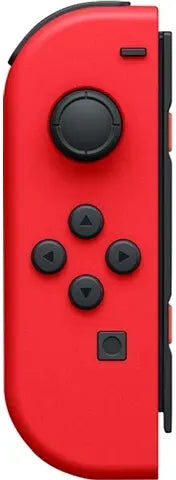
Nintendo Switch Joy-Con (L) Odyssey Red Controller, Used - GoodOverview Add vibrant colour and extra control to your Nintendo Switch setup with the Nintendo Switch Joy-Con (L) in Odyssey Red. Designed for flexible play, this official left Joy-Con controller delivers responsive controls, smooth wireless performance, and versatile gaming options. Whether you're replacing a controller, building a second set for multiplayer, or upgrading your setup with a bold red finish, this Joy-Con offers authentic Nintendo quality and seamless compatibility. Key Features Official Nintendo Switch Joy-Con (L) controller in Odyssey Red Wireless connectivity for smooth, responsive gameplay Can be used in handheld mode, tabletop mode, or detached play Motion controls for immersive gameplay in supported titles Compatible with Nintendo Switch and Nintendo Switch OLED Model Ergonomic design for comfortable gaming sessions Ideal replacement left Joy-Con or additional controller for multiplayer Easy sync and pairing with Switch consoles Benefits The Joy-Con (L) Odyssey Red gives you flexible gaming freedom, whether you're playing at home or on the move. Use it as a replacement controller, an extra Joy-Con for party games, or to refresh your Switch setup with a standout colour. With reliable wireless connection and motion control features, it ensures smooth, enjoyable gameplay across a wide range of Nintendo titles. Specifications Specification Details Brand Nintendo Product Joy-Con (L) Colour Odyssey Red Compatibility Nintendo Switch / Switch OLED Connection Wireless Features Motion controls Use Modes Handheld, tabletop, detached Side Left (L) Type Official Nintendo Controller25,00 £*Shipping: 0,00 £Secure redirect to the provider


-
Why aren't the Joy-Con buttons working?
The Joy-Con buttons may not be working due to a variety of reasons such as low battery levels, interference from other electronic devices, or a software glitch. It is also possible that the buttons themselves are physically damaged or worn out. Troubleshooting steps such as re-syncing the controllers, charging them fully, or resetting them may help resolve the issue. If the problem persists, it may be necessary to contact Nintendo customer support for further assistance or consider getting the Joy-Cons repaired or replaced. **
-
Why doesn't the Joy-Con rotate individually?
The Joy-Con controllers do not rotate individually because they are designed to be used together as a pair, with one in each hand. The rotation of the Joy-Con controllers is meant to be synchronized, allowing for motion-controlled gameplay and immersive experiences. Individual rotation would not provide the same level of precision and coordination that is achieved when the controllers move together. Additionally, the design of the Joy-Con controllers allows for flexibility in how they are used, such as being attached to the console or used separately, but individual rotation is not a feature that was included in their design. **
-
Why are the Joy-Con buttons not working?
The Joy-Con buttons may not be working due to a variety of reasons such as dirt or debris blocking the buttons, a software issue, or a hardware malfunction. It is also possible that the buttons are not working due to wear and tear from extended use. Troubleshooting steps such as cleaning the buttons, updating the controller firmware, or recalibrating the Joy-Con may help resolve the issue. If the problem persists, it may be necessary to contact Nintendo customer support for further assistance or consider repairing or replacing the Joy-Con. **
-
Is the Nintendo Switch Joy-Con R defective?
The Nintendo Switch Joy-Con R has been known to have issues with connectivity and drifting, which can make it seem defective. These issues can be frustrating for users and may require repair or replacement. However, not all Joy-Con R controllers are defective, and some users may not experience any problems with their device. It is important to contact Nintendo customer support if you believe your Joy-Con R is defective to explore potential solutions. **

Why does the right Joy-Con lose connection?
The right Joy-Con may lose connection due to interference from other electronic devices, low battery levels, or physical obstructions between the Joy-Con and the Nintendo Switch console. Additionally, issues with the Bluetooth connection or a faulty Joy-Con can also cause it to lose connection. It is recommended to ensure that the Joy-Con is fully charged, remove any potential sources of interference, and try re-syncing the Joy-Con with the console to resolve connection issues. **
How can I use the Joy-Con controllers?
The Joy-Con controllers can be used in a variety of ways, depending on the game and the player's preferences. They can be attached to the sides of the Nintendo Switch for handheld mode, used separately for two-player gaming, or connected to the Joy-Con grip for a more traditional controller experience. Additionally, the controllers have motion-sensing capabilities and HD rumble, allowing for unique gameplay experiences in certain games. Overall, the Joy-Con controllers offer versatility and flexibility for different gaming styles and situations. **
Top-Angebote
Products related to Uplifted-Finds-Joy-Con:
-
Uplifted Finds Joy Con Comfort Grip Handle Bracket Ergonomic Controller Holder For Nintendo Switch & Switch OLED redTransform your individual JoyCon controllers into a fullsized classic gamepad with this JoyCon Bracket Stand Holder. Compatible with both standard Nintendo Switch and Nintendo Switch OLED JoyCon controllers, this ergonomic grip accessory offers a...30,97 $*Shipping: 0,00 $Secure redirect to the provider
-
CaseAndConnect XDcase Nintendo Switch 2 Joy Con Case With Clear TPU Cover And Joystick Caps For Nintendo Switch 2 Joy ConProtect your controllers without hiding their original look. This 1 pc Nintendo Switch 2 JoyCon case uses soft, flexible TPU to help guard against scratches, dust, scuffs, and everyday wear. Precision cutouts keep buttons and controls easy to...39,97 $*Shipping: 0,00 $Secure redirect to the provider
-
CaseAndConnect XDcase Nintendo Switch Joy Con Case Clear TPU Cover With 8 Thumb Grip Caps For Nintendo Switch Switch OLED Joy ConKeep your controllers looking cleaner, feeling better, and ready for every gaming session. This 1 pc Nintendo Switch JoyCon case set wraps your controllers in soft, transparent TPU to guard against scratches, dust, scuffs, and everyday wear....39,97 $*Shipping: 0,00 $Secure redirect to the provider
-
Multicon Wholesale Hub Switch Repair Tool Set For Joy Con And Console Opening Switch Repair Tool Set For Joy Con And Console OpeningTake the stress out of small console fixes with a tool set made for more confident handson repairs. This Nintendo Switch repair tool set is ideal for gamers, hobbyists, and DIY tinkerers who want a simple way to handle basic console or JoyCon...59,97 $*Shipping: 0,00 $Secure redirect to the provider
-
Can you change the Joy-Con?
Yes, the Joy-Con controllers for the Nintendo Switch can be changed. They are designed to be easily removed and replaced, allowing for customization and repair. This feature allows users to switch between different colored Joy-Cons or replace a damaged controller without having to replace the entire system. **
-
Can you change the Nixy Joy-Con?
No, the Nixy Joy-Con cannot be changed or replaced as it is a fixed component of the Nixy portable gaming system. The Joy-Con is built into the device and is not designed to be removed or swapped out for different controllers. If you are looking for a portable gaming system with interchangeable controllers, you may want to consider other options that offer this feature. **
-
Why aren't the Joy-Con buttons working?
The Joy-Con buttons may not be working due to a variety of reasons such as low battery levels, interference from other electronic devices, or a software glitch. It is also possible that the buttons themselves are physically damaged or worn out. Troubleshooting steps such as re-syncing the controllers, charging them fully, or resetting them may help resolve the issue. If the problem persists, it may be necessary to contact Nintendo customer support for further assistance or consider getting the Joy-Cons repaired or replaced. **
-
Why doesn't the Joy-Con rotate individually?
The Joy-Con controllers do not rotate individually because they are designed to be used together as a pair, with one in each hand. The rotation of the Joy-Con controllers is meant to be synchronized, allowing for motion-controlled gameplay and immersive experiences. Individual rotation would not provide the same level of precision and coordination that is achieved when the controllers move together. Additionally, the design of the Joy-Con controllers allows for flexibility in how they are used, such as being attached to the console or used separately, but individual rotation is not a feature that was included in their design. **
Similar search terms for Uplifted-Finds-Joy-Con
-
PowerA Joy-Con Comfort Grip for Nintendo Switch, OLED & Lite – Mystery Block Mario Edition, Officially Licensed, NewOverview: The PowerA Joy-Con Comfort Grip for Nintendo Switch, OLED Model, and Nintendo Switch Lite brings style and comfort to your gaming experience. Featuring a Mystery Block Mario design, this officially licensed grip offers a unique and fun way to hold your Joy-Cons, transforming your gaming sessions into a more comfortable and enjoyable experience. The ergonomic design provides a secure, comfortable grip for hours of gameplay, while the game controller-style feel makes it perfect for players looking for more control. Key Features: Mystery Block Mario Design : Featuring a Mystery Block Mario design, this grip adds a fun and iconic touch to your Nintendo Switch setup, perfect for fans of the Mario franchise. Officially Licensed : As an officially licensed Nintendo product, the PowerA Joy-Con Comfort Grip is crafted to meet the highest quality standards, ensuring it works perfectly with your Nintendo Switch, OLED Model, and Nintendo Switch Lite. Ergonomic Gamepad Design : The ergonomic gamepad-style design offers a more comfortable and secure grip compared to holding the Joy-Cons directly, making it ideal for long gaming sessions. Compatible with Multiple Models: The PowerA Joy-Con Comfort Grip is compatible with the Nintendo Switch, OLED Model, and Nintendo Switch Lite, giving you versatility regardless of your Nintendo console. Easy-to-Use, Secure Fit : The grip allows for easy attachment and secure fitting of your Joy-Cons, providing a stable and reliable connection for seamless gaming. Lightweight and Portable : Lightweight and compact, this grip is easy to carry with you, allowing you to game comfortably wherever you go. Enhanced Control : The controller-like feel provides enhanced control and stability, offering a better gaming experience for games that require precise movements. Product Description: The PowerA Joy-Con Comfort Grip for Nintendo Switch, OLED Model, and Nintendo Switch Lite with a Mystery Block Mario design is the ultimate accessory for fans who want both comfort and style. Featuring an ergonomic, gamepad-inspired grip, this officially licensed controller provides enhanced control and a more comfortable hold during extended gaming sessions. Compatible with multiple Nintendo consoles, it allows you to enjoy your games with a secure fit and easier handling, all while showcasing a fun and iconic Mario theme.13,00 £*Shipping: 0,00 £Secure redirect to the provider
-
Nintendo Switch Joy-Con (L) Odyssey Red Controller, Used - GoodOverview Add vibrant colour and extra control to your Nintendo Switch setup with the Nintendo Switch Joy-Con (L) in Odyssey Red. Designed for flexible play, this official left Joy-Con controller delivers responsive controls, smooth wireless performance, and versatile gaming options. Whether you're replacing a controller, building a second set for multiplayer, or upgrading your setup with a bold red finish, this Joy-Con offers authentic Nintendo quality and seamless compatibility. Key Features Official Nintendo Switch Joy-Con (L) controller in Odyssey Red Wireless connectivity for smooth, responsive gameplay Can be used in handheld mode, tabletop mode, or detached play Motion controls for immersive gameplay in supported titles Compatible with Nintendo Switch and Nintendo Switch OLED Model Ergonomic design for comfortable gaming sessions Ideal replacement left Joy-Con or additional controller for multiplayer Easy sync and pairing with Switch consoles Benefits The Joy-Con (L) Odyssey Red gives you flexible gaming freedom, whether you're playing at home or on the move. Use it as a replacement controller, an extra Joy-Con for party games, or to refresh your Switch setup with a standout colour. With reliable wireless connection and motion control features, it ensures smooth, enjoyable gameplay across a wide range of Nintendo titles. Specifications Specification Details Brand Nintendo Product Joy-Con (L) Colour Odyssey Red Compatibility Nintendo Switch / Switch OLED Connection Wireless Features Motion controls Use Modes Handheld, tabletop, detached Side Left (L) Type Official Nintendo Controller25,00 £*Shipping: 0,00 £Secure redirect to the provider
-
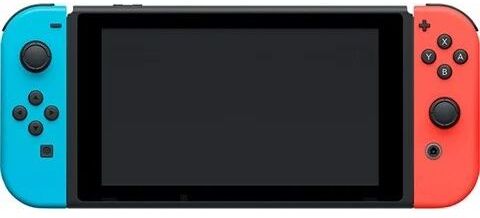
Nintendo Switch Console, 32GB + Neon Red/Blue Joy-Con, Used - Good✅ Nintendo Switch Console – 32GB with Neon Red & Blue Joy-Con Controllers Experience the freedom of gaming anywhere, anytime, with the versatile Nintendo Switch Console. Whether you're at home, traveling, or hanging out with friends, the Nintendo Switch adapts to your lifestyle and brings your favorite games to life like never before. ✅ Play Anytime, Anywhere Enjoy three dynamic play modes: TV Mode – Dock the console and play on the big screen Tabletop Mode – Use the kickstand for multiplayer fun on the go Handheld Mode – Take your games with you and play anywhere ✅ Includes Neon Red & Blue Joy-Con Controllers The iconic Neon Red and Neon Blue Joy-Con controllers offer intuitive motion control, HD rumble feedback, and can be used together or separately for solo or multiplayer gaming. ✅ 32GB Internal Storage The built-in 32GB storage provides space for downloadable games, save data, and screenshots. You can also expand storage using a microSD card (sold separately). ✅ Bright, Vivid 6.2” Touchscreen Enjoy your games on a 6.2-inch capacitive multi-touch screen with crisp resolution and vibrant color—perfect for handheld play. ✅ Wide Game Library Play a growing library of titles, including The Legend of Zelda, Mario Kart, Animal Crossing, Super Smash Bros, Splatoon, and more. Family-friendly, fun, and packed with excitement. ✅ Multiplayer Ready Play online with Nintendo Switch Online membership (sold separately) Connect locally with up to 8 consoles for multiplayer gaming Detach the Joy-Cons to instantly start 2-player games right out of the box ✅ Battery Life for the Long Haul With an improved battery life of up to 9 hours, depending on usage, the Switch is built for extended gaming sessions whether you're at home or on the move. ✅ Perfect For All Ages Whether you're a casual gamer, seasoned pro, or looking for fun for the whole family, the Nintendo Switch offers something for everyone. ✅ Why Choose Nintendo Switch? With its versatile design, massive game library, and multiplayer capabilities, the Nintendo Switch is the ultimate choice for gaming fun at home and on the go.164,99 £*Shipping: 0,00 £Secure redirect to the provider
-
Uplifted Finds Joy Con Comfort Grip Handle Bracket Ergonomic Controller Holder For Nintendo Switch & Switch OLED blueTransform your individual JoyCon controllers into a fullsized classic gamepad with this JoyCon Bracket Stand Holder. Compatible with both standard Nintendo Switch and Nintendo Switch OLED JoyCon controllers, this ergonomic grip accessory offers a...30,97 $*Shipping: 0,00 $Secure redirect to the provider
-
Why are the Joy-Con buttons not working?
The Joy-Con buttons may not be working due to a variety of reasons such as dirt or debris blocking the buttons, a software issue, or a hardware malfunction. It is also possible that the buttons are not working due to wear and tear from extended use. Troubleshooting steps such as cleaning the buttons, updating the controller firmware, or recalibrating the Joy-Con may help resolve the issue. If the problem persists, it may be necessary to contact Nintendo customer support for further assistance or consider repairing or replacing the Joy-Con. **
-
Is the Nintendo Switch Joy-Con R defective?
The Nintendo Switch Joy-Con R has been known to have issues with connectivity and drifting, which can make it seem defective. These issues can be frustrating for users and may require repair or replacement. However, not all Joy-Con R controllers are defective, and some users may not experience any problems with their device. It is important to contact Nintendo customer support if you believe your Joy-Con R is defective to explore potential solutions. **
-
Why does the right Joy-Con lose connection?
The right Joy-Con may lose connection due to interference from other electronic devices, low battery levels, or physical obstructions between the Joy-Con and the Nintendo Switch console. Additionally, issues with the Bluetooth connection or a faulty Joy-Con can also cause it to lose connection. It is recommended to ensure that the Joy-Con is fully charged, remove any potential sources of interference, and try re-syncing the Joy-Con with the console to resolve connection issues. **
-
How can I use the Joy-Con controllers?
The Joy-Con controllers can be used in a variety of ways, depending on the game and the player's preferences. They can be attached to the sides of the Nintendo Switch for handheld mode, used separately for two-player gaming, or connected to the Joy-Con grip for a more traditional controller experience. Additionally, the controllers have motion-sensing capabilities and HD rumble, allowing for unique gameplay experiences in certain games. Overall, the Joy-Con controllers offer versatility and flexibility for different gaming styles and situations. **
* All prices are inclusive of VAT and, if applicable, plus shipping costs. The offer information is based on the details provided by the respective shop and is updated through automated processes. Real-time updates do not occur, so deviations can occur in individual cases. ** Note: Parts of this content were created by AI.